
The Wi-Fi at the RoboCup 2026 venue in Incheon was bad for pretty much every team there. Latency swung around with no pattern, connections dropped and then came back on their own, and in the middle of a match our robots still had to know where their teammates were standing. A soccer robot that does not know where its friend is will run straight into it 💀 Or maybe it just stands there dazed lol...
That is where the "UDP or TCP?" debate, which always sounded theoretical back on campus, suddenly became a serious matter. I worked on the communication software for IRIS ITS, and before flying out we had prepared three different communication plans. The question boiled down to one thing: which data is allowed to be late, and which data must never be lost?
This article sums up how I sort out the answer. It covers UDP, TCP, and WebSocket for robot telemetry, with code you can run on your own laptop and a way to wreck your own network so you can tell whether your design holds up.

Forget "which is fastest", ask this first
Almost every UDP vs TCP comparison ends in the same table: TCP is reliable but slow, UDP is fast but lossy. True, sure. But that table does not help you decide anything.
A more useful question: if this data arrives late, is it still worth anything?
The robot position from two seconds ago? Useless. The robot already moved, and you are computing against a world that no longer exists. A "stop" command that shows up two seconds late? Still very useful, in fact it must arrive. Losing it entirely is far worse than getting it late.
So robot telemetry is really two kinds of data that need opposite treatment. The first is continuously updated state: position, velocity, sensors, battery. Only the latest value matters, and old values expire the moment a new one arrives. The second is commands and events: start, stop, role assignment, configuration. Every message matters, and so does their order.
One protocol for both? Almost certainly one of them suffers.
TCP is loyal, and that is the problem
TCP makes two promises: every byte arrives, and arrives in the same order. It keeps them by retransmitting what got lost, then holding back everything after it until the hole is filled.
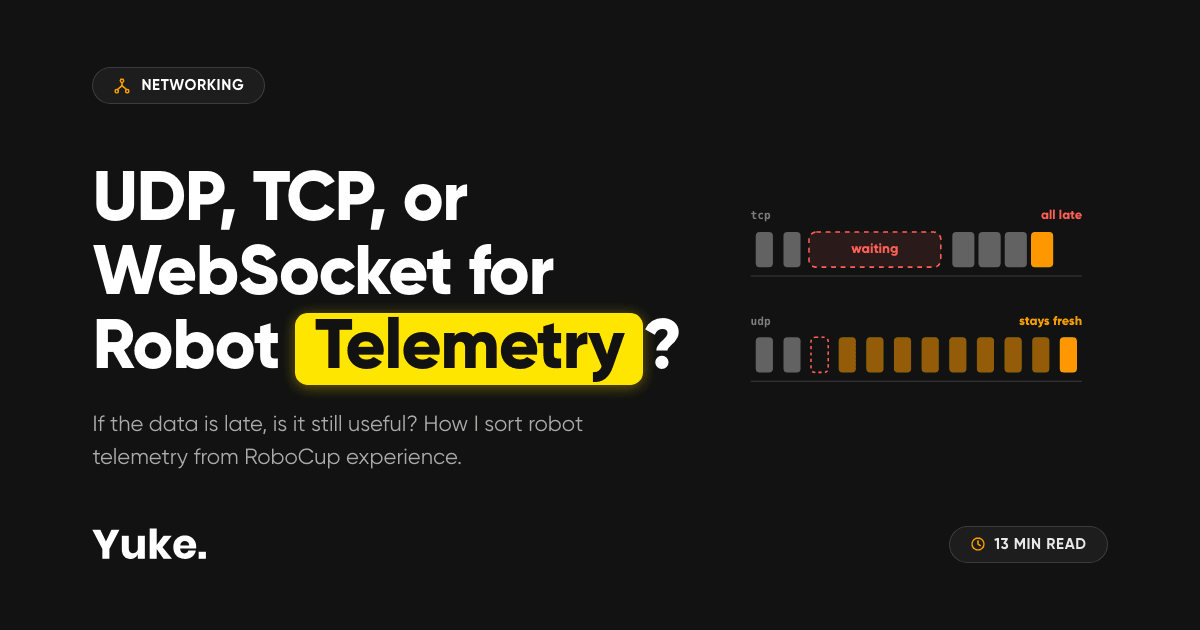
That "holding back" is what hurts telemetry. It is called head-of-line blocking. Picture a robot sending states 1 through 6, and number 3 vanishes into thin air. Packets 4, 5, and 6 have actually already shown up in the receiver's kernel. But the application is not allowed to read them until number 3 turns up again. So it waits.

When number 3 finally arrives, the application receives 3, 4, 5, 6 all in one burst. All it needed was number 6. The first three are garbage that showed up late.
How long is the wait? On Linux, the floor for the retransmission timeout (RTO) is 200 ms, and it doubles every time a retransmit fails. On busy Wi-Fi, two or three failures in a row are enough to hold your robot state for seconds. For a robot moving a few meters per second, that is a long way.
Two more small things people often miss. First, Nagle's algorithm, which batches small messages before sending them. It saves bandwidth but adds delay for small messages like telemetry. Turn it off with TCP_NODELAY (in Node.js: socket.setNoDelay(true)). Second, congestion backoff: TCP assumes a lost packet means the network is full, and hits the brakes. But on Wi-Fi packets get lost from weak signal far more often, and the road itself is empty. TCP brakes on an empty road.
Note: TCP is not doing anything wrong here. That is the price of the promise "everything arrives, in order". For file transfers or commands, the price is worth paying. For robot position, it is not.
UDP: free, but you clean up after it
UDP is fire and forget. Send it, then forget it. It does not care whether the packet arrived, it does not wait for an acknowledgment, it just keeps sending. Like dropping a letter into a mailbox without asking for a receipt lol.
That sounds careless, but for state updated 20 times per second, it is a feature. A lost packet will be replaced by the next one 50 ms later, so there is no point chasing the old one. Packets can also be duplicated or arrive out of order, and nobody retransmits anything. That is what makes UDP a good fit for state: nobody holds packet 6 hostage for packet 3.
The consequence is that a few chores land on you.
First, sequence numbers. Give every packet a seq that keeps growing. The receiver drops any packet whose seq is not greater than the last one it accepted, and out-of-order and duplicate packets are both handled at once.
Second, send full state, not deltas. If packet 5 says "x increased by 0.1" and packet 5 is lost, the receiver is wrong forever. If every packet carries a complete x, y, and heading, losing one packet only means you skipped one tick. It costs a bit more bandwidth and is far more robust.
Third, detect silence. UDP has no idea the other side is dead. The receiver needs its own clock: if nothing arrives from robot X for a few hundred milliseconds, mark its data stale. Use the receiver's clock, not the robot's, because two machines' clocks are almost never in sync.
A few practical notes:
- Keep datagrams under roughly 1400 bytes. Beyond the MTU, IP splits them into fragments, and losing one fragment means the whole datagram is lost.
- Multicast on Wi-Fi depends on the access point settings. The reason we did not use it is in the three plans section below.
- UDP has no congestion control. Send 1000 packets per second into a network that can only carry 200, and it will happily obey and drown everything. Pick a sane send rate.
WebSocket: your ticket into the browser
Browsers cannot open raw UDP or TCP sockets. If you want a dashboard in the browser, WebSocket is the door.
WebSocket is TCP with an HTTP handshake in front and message framing on top. That means every TCP trait from above comes along: one lost packet, and the messages after it are held. On a dashboard the effect is ugly. The screen freezes for a few seconds, then the robot jumps to a new position because all the delayed messages arrive at once.
The cure is on the server side. Do not forward every packet from the robot to the browser. Keep the latest state per robot in a gateway, then push a snapshot to the browser at a fixed rate. If a client is slow and its send queue piles up, skip that tick. A slow client just sees data less often, but never sees data older than it should.
Our Base Station has a Node server that receives UDP and forwards it to a Vue UI over WebSocket. The version in this article adds two habits: keep only the latest state, and skip slow clients. That Node server was only used in one of our plans, and the other two did not need it. The story is in the next section.

If you need an unreliable path straight to the browser, a WebRTC DataChannel can be configured unordered with maxRetransmits: 0. That is a topic for its own article, and the gateway above is enough for most dashboards.
Three plans we had before flying out
A bit of stack context first. Our robots run C++ with ROS1, and the Base Station uses Node.js and Vue. On the ROS side we subscribe to many topics (robot pose and friends), then publish to a bs2pc topic that carries the data of all peer robots. For how that data moves between robots and to the Base Station, we had three plans.
| Plan | How it works | Main problem | Result |
|---|---|---|---|
| UDP multicast, peer to peer | Each robot broadcasts its state to one multicast address. A Node server on the Base Station receives the UDP and forwards it to the UI over WebSocket | Depends on AP settings, including the beacon interval | Not chosen |
| UDP unicast, peer to peer | Robots talk to each other directly over UDP unicast. The Base Station UI uses roslib directly | No dependence on how the AP handles multicast | Chosen |
| Full roslib | All communication goes through roslib, and the UI uses roslib directly too | Too many hops, long round trip | Not chosen |
Multicast looks the most elegant on paper. Send once, every robot hears it, and there is no address list to maintain. The problem is Wi-Fi. The access point holds multicast frames for clients in power-save mode and only releases them after a certain beacon, so the delay follows the beacon interval configured on the AP. Those settings belong to the venue organizers, and we could not touch them. A plan whose performance depends on a configuration we cannot change is risky, no matter how elegant the design. In this plan the Base Station uses that Node server: receive UDP, forward to the UI over WebSocket.
Full roslib is the opposite. Everything goes through one tidy path, but there are too many hops and the round trip is very long for data that goes stale fast. Roslib also runs on top of WebSocket, so the TCP traits we covered above come along. The UI talks to roslib directly.
UDP unicast between robots was the best one. Each robot sends its state straight to the other robots with no middleman. No extra hops, and no dependence on how the AP treats multicast. The Base Station still uses roslib, and since the UI can talk to roslib directly, that Node server is no longer needed.
This is the result for our network, our APs, and our robots. Another venue could give another answer, which is why the last habit in this article is to measure first.
Day one in Incheon: 2.4 GHz collapses
Plans on paper are one thing. The field has its own story.
Before MSL started, everything was fine. When we practiced on the main field, communication ran smoothly, man. It was only when Falcons and Toulon came onto the field that we felt it right away. A network that was roomy a minute ago suddenly got crowded.
Day one of the competition was much worse. Other competition categories were playing too, the venue was full of devices, and the lag was severe. The old rules use 2.4 GHz, so that day we were on the same band as the entire building. Our robots' delay hit 2000 to 3000 ms. Two to three seconds. The Falcons robots did not move at all.
Luckily I had already prepared an external Wi-Fi antenna. A hunch, honestly haha 😅
The next day the frequency was changed to 5 GHz and we used DFS channels so we would not fight over airtime with other devices in the venue. The result: our communication was smooth. Poor Falcons, though: they had already changed their program, so their communication was a mess until the last day.
Why does 2.4 GHz collapse so easily? That band has only three channels that do not overlap (1, 6, and 11), and every device in the building shares those three lanes: phones, laptops, access points, Bluetooth. DFS channels in 5 GHz share spectrum with radar, so an AP must move away if it detects radar. Many devices avoid them, which is why they are usually quieter. The price: if radar is detected, the AP must switch channels and there is a short gap.
The lesson: no protocol, however good, helps when the medium is saturated. My debugging order now is radio first (band, channel, antenna), then protocol.
Cheat sheet: which data goes where
A summary I use as a starting point:
| Data type | Examples | Choice | Why |
|---|---|---|---|
| Continuously updated state | position, velocity, sensors | UDP | Old values expire when a new one arrives, nothing needs to be held back |
| Heartbeat | an "I am still alive" signal | UDP | Only presence matters, losing one is fine |
| Critical commands | start, stop, role assignment | TCP | Every message must arrive, in order |
| Config and files | parameters, logs, maps | TCP | Large and must arrive intact |
| Browser dashboard | Base Station, monitoring | WebSocket through a gateway (or roslib if you already run ROS) | Browsers cannot speak UDP, the gateway filters out stale data |
| Video | robot camera | UDP-based protocols (RTP, WebRTC) | An old frame is useless, quality may drop |
The pattern reads clearly: state goes over UDP, commands go over TCP, the browser gets WebSocket through a gateway. In our RefBox, the command path uses TCP and WebSocket, because messages are few but every one must arrive, in order.
Hands-on: a UDP to WebSocket gateway in about 60 lines
We will build three files in one folder: a fake robot that sends state over UDP, a gateway that keeps the latest state, and a viewer that reads from WebSocket. The real robot is C++ with ROS1. Here I use Node so you can run it without ROS.
Prerequisite: Node.js 22 or newer (the built-in WebSocket client is used in the last step).
mkdir telemetry-demo && cd telemetry-demo
npm init -y
npm pkg set type=module
npm i ws
1. The fake robot
File robot.mjs. The LOSS variable simulates packets lost on the way.
import dgram from 'node:dgram';

const socket = dgram.createSocket('udp4');
const ID = process.env.ROBOT_ID ?? 'r1';
const LOSS = Number(process.env.LOSS ?? 0); // 0..1, simulated packet loss
let seq = 0;

setInterval(() => {
  seq += 1;
  if (Math.random() < LOSS) return; // packet "lost on the way"

  const state = {
    id: ID,
    seq,
    x: Math.cos(seq / 20),
    y: Math.sin(seq / 20),
    heading: (seq * 3) % 360,
  };

  socket.send(JSON.stringify(state), 9000, '127.0.0.1');
}, 50); // 20 Hz
Notice every packet carries the full state, not a delta.
2. The gateway
File gateway.mjs. The three rules from the UDP section are all here: drop what is older, mark stale data using the gateway's clock, and skip slow clients.
import dgram from 'node:dgram';

import { WebSocketServer } from 'ws';

const STALE_MS = 500; // past this, data counts as stale
const RESET_MS = 2_000; // robot silent this long, assume it restarted
const PUSH_MS = 100; // 10 Hz to the browser
const MAX_BUFFERED = 64 * 1024; // slow client, skip this tick

/** robotId -> { state, recvAt } */
const latest = new Map();

const udp = dgram.createSocket('udp4');

udp.on('message', (msg) => {
  let state;
  try {
    state = JSON.parse(msg);
  } catch {
    return; // corrupt packet, just drop it
  }

  const now = Date.now();
  const prev = latest.get(state.id);

  // Datagrams can arrive out of order. Anything older than what we have is dropped.
  // If the robot was silent for a while, its seq may have reset after a restart, so accept.
  const restarted = prev && now - prev.recvAt > RESET_MS;
  if (prev && !restarted && state.seq <= prev.state.seq) return;

  latest.set(state.id, { state, recvAt: now });
});

udp.bind(9000, () => console.log('udp :9000'));

const wss = new WebSocketServer({ port: 8080 }, () =>
  console.log('ws  :8080')
);

setInterval(() => {
  const now = Date.now();
  const snapshot = JSON.stringify(
    [...latest.values()].map(({ state, recvAt }) => ({
      ...state,
      ageMs: now - recvAt,
      stale: now - recvAt > STALE_MS,
    }))
  );

  for (const client of wss.clients) {
    if (client.readyState !== client.OPEN) continue;
    if (client.bufferedAmount > MAX_BUFFERED) continue;
    client.send(snapshot);
  }
}, PUSH_MS);
Note: therestartedblock handles an easy-to-miss case. A restarted robot starts again fromseq1. Without that exception, the gateway would drop all of its new packets as "older" untilseqcatches up with the old number.
3. The viewer
File viewer.mjs, standing in for the browser dashboard.
const ws = new WebSocket('ws://127.0.0.1:8080');
let n = 0;

ws.onmessage = (e) => {
  const robots = JSON.parse(e.data);
  for (const r of robots) {
    console.log(`${r.id} seq=${r.seq} age=${r.ageMs}ms stale=${r.stale}`);
  }
  if (++n >= 12) process.exit(0);
};
4. Run it and prove it
In three separate terminals:
node gateway.mjs
LOSS=0.3 node robot.mjs
node viewer.mjs
Check that it works: viewer.mjs should print lines like the ones below. Notice seq jumping (three packets lost out of ten is normal with LOSS=0.3) while age stays small. If there are no lines at all, the gateway has not received anything. Check that robot.mjs is running and the port is 9000.
r1 seq=30 age=75ms stale=false
r1 seq=33 age=23ms stale=false
r1 seq=34 age=73ms stale=false
r1 seq=36 age=72ms stale=false
r1 seq=39 age=20ms stale=false
That is the heart of the design. Even with 30 percent packet loss, the data reaching the viewer stays fresh. No backlog piles up, no burst jumps.
Now stop robot.mjs (Ctrl+C) and run viewer.mjs again:
r1 seq=54 age=367ms stale=false
r1 seq=54 age=1075ms stale=true
r1 seq=54 age=1480ms stale=true
seq stalls at 54 and age keeps climbing. Once it passes 500 ms, the status flips to stale=true (I trimmed some lines). A good dashboard can tell "the robot is standing still" apart from "we have stopped hearing from the robot".

Break your network before the venue does
The LOSS simulation only drops packets at the sender. For something more honest, on Linux you can wreck a real network interface with tc netem:
# add 100 ms delay (30 ms jitter) and drop 5% of packets on eth0
sudo tc qdisc add dev eth0 root netem delay 100ms 30ms loss 5%

# put it back the way it was
sudo tc qdisc del dev eth0 root
Warning: run this on a machine you are sitting at. If you apply it to the interface your SSH session uses, that session will lag or drop.
Then compare two approaches with the same data: send state over TCP (or WebSocket straight from the robot) and through the UDP gateway. On a clean network they look the same. Once netem is on, you will see the difference yourself. A test like this is more convincing than any argument in this article.
Habits I keep now
A few habits that decide whether a system survives when the network gets worse:
- Put a time limit on every receiver. Data without an age can lie, so mark it stale and do not hide it.
- Decide the safe behavior for silence. If a robot hears no command for a while, what does it do? Stop, carry on? The answer must be a decision, not an accident.
- Measure on a bad network, not at your desk. At your desk every protocol looks great.
- Separate the paths. Critical commands should not queue behind the telemetry stream.
- Check the radio layer before blaming the protocol: band, channel, and antenna. In Incheon, moving from 2.4 GHz to 5 GHz DFS is what fixed things.
- Pack spare hardware. An external antenna is cheap, and we needed it badly.
I am not claiming this setup is optimal for every robot. Other teams have different needs, and some leagues have their own communication rules that limit your options. But the opening question applies anywhere: if this data is late, is it still useful? If the answer is no, do not hand it a protocol that is willing to wait.